praxi is a video codec and player for games, written in pure Rust (me guiding Claude of course). It’s named after the praxinoscope, the 19th-century animation device. 0.1.1 is out today on crates.io, with release binaries for Linux, macOS and Windows. It took two codecs to get here. The first one decoded almost for free but made files that were far too big.
What a game wants from video
A video player for a film is built to keep the file small. A game has other needs:
- Decode must be cheap and predictable. The video shares the frame with gameplay, so a 4 ms decode spike is a dropped frame. No YUV conversion and no per-pixel CPU work. Nothing allocated per frame, and no threads spawned behind the engine’s back.
- The frame should end up in VRAM as a texture that works anywhere a texture does: a fullscreen cutscene, a TV screen inside a level, a UI panel, a material.
- One file for every platform, with alpha, seamless loops, fast seeks and several videos playing at once.
- The game has to react to the video. A cutscene is not only pixels and sound. The camera shakes when the door slams, a subtitle appears when someone speaks, a marker points at the thing you’re meant to look at.
Size matters too, but at first I didn’t think it mattered much.
codec-v1: frames as GPU texture blocks
The first idea was simple: store every frame already in the GPU’s block-compressed format. BC7 on desktop, ASTC on mobile. Then playback is just “decompress a bit and upload”. The GPU samples BC7 natively, so no pixel is ever touched on the CPU, and the frame stays compressed in VRAM (2 MB for a 1080p BC7 frame).
The encoder uses ktx-rs, my Rust port of KTX-Software: UASTC transcoded to BC7, and astcenc for ASTC. One file can hold several variants of the same track. The game lists the formats its GPU supports, and the player picks one. This version is tagged codec-v1 in the repo (container format 0.7).
The test input was 10 s of Big Buck Bunny at 1080p60. The source H.264 file runs at 1.05 MB/s. Raw BC7 is about 1 byte per pixel:
| Variant | Raw | + LZ4 | + temporal skip | PSNR |
|---|---|---|---|---|
| BC7 | 124 MB/s | 125 MB/s | 89 MB/s | 41.4 dB |
| ASTC 6x6 | 55 MB/s | 56 MB/s | 44 MB/s | - |
| ASTC 8x8 | 31 MB/s | 31 MB/s | 26 MB/s | - |
LZ4 made BC7 bigger. Block-compressed data looks like noise when the bytes are interleaved: every 16-byte block mixes mode bits, endpoints and indices. Temporal skip helped: a delta frame stores a bitmask, one bit per block, plus only the blocks that changed. That skipped about 29% of blocks, but it was still 89 MB/s.
So I spent a day pulling every lever I could find inside the block format:
- Byte planes. Transpose the blocks so that byte 0 of every block comes first, then byte 1 of every block, and so on. Each byte position has its own statistics. Mode and partition bytes take only a few values, endpoint high bits change slowly. Planes turn those into runs for LZ4, or into skewed distributions for an entropy coder.
- XOR residuals. A changed block is stored as the new block XORed with the old one at the same position. A block that changes usually keeps its mode, its partition and the high bits of its endpoints, so most residual bytes are zero. In BC7 byte planes the endpoint bytes dropped from 7.6 to 4.3-5.0 bits of entropy per byte.
- Huffman per section. An order-0 canonical Huffman code per plane, 4 interleaved streams, two symbols per table lookup when they fit. It decodes at about 1 GB/s on one core. The writer only uses it when it saves at least 8% over LZ4, because it decodes several times slower.
Things I measured and set aside:
- zstd was 7.5-12.5% smaller than LZ4, but the pure-Rust decoder took 4 ms per 1080p frame, against 0.06 ms for LZ4.
- Block motion copy: only 0.6% of changed BC7 blocks had a usable source nearby. Camera motion is rarely aligned to 4-pixel blocks.
- Context modeling gave nothing on BC7.
The final codec-v1 numbers (make bench, first 3 s):
| Variant | Size | PSNR | Decode per frame |
|---|---|---|---|
| BC7 | 55.6 MB/s | 41.0 dB | 1.5 ms |
| ASTC 6x6 | 34.1 MB/s | 37.4 dB | 0.9 ms |
| ASTC 8x8 | 18.4 MB/s | 34.0 dB | 0.6 ms |
I got it down from 124 to 55.6 MB/s, and decode stayed cheap. But that is still 53 times the H.264 source. A one-minute 1080p60 cutscene would be over 3 GB. Smaller block formats don’t help much: ASTC 8x8 is “only” 18 MB/s and already looks soft at 34 dB. Block formats have a fixed quality ceiling, and the size is roughly fixed with it. You can squeeze the bytes, but you can’t spend fewer bits on a flat sky than on grass.
For a few short loops on a menu screen, that’s fine, and the block variants are still in praxi for exactly that. For cutscenes it’s a non-starter. That’s where codec-v1 stopped.
The motion codec: transform coding, decoded on the GPU
The way out is the one every real video codec takes: transform coding with motion compensation, the H.264 family. Its quality is set by its bitrate, so there is no ceiling. Before writing any code I wrote down the goal: at most 1/5 of BC7’s size at BC7’s PSNR, or the project stops.
The problem is decode cost. A classic decoder works through a frame one step at a time, and a game can’t spare that. Bink 2 solved it: do only the small sequential part on the CPU and the rest on the GPU. That gives the design a few rules:
- YCoCg instead of YCbCr. The color transform is exact integer math, so it costs almost nothing and there is no matrix to signal. Chroma is 4:2:0 by default, 4:4:4 for UI and graphics with sharp colored edges. Alpha is a fourth plane.
- 16x16 macroblocks and an 8x8 integer DCT with flat quantization (
qp0-51, step doubles every 6). Flat steps give the most PSNR per bit, and PSNR parity with BC7 was the target. - No spatial intra prediction. In H.264 each block waits for its left and upper neighbours, which serializes the GPU. Here every block of a frame reconstructs on its own, so one dispatch decodes a frame. Keyframes still get some spatial redundancy from DC prediction in the coefficient domain, resolved on the CPU during entropy decoding.
- P frames only, no B frames. Decode order is display order, a frame never waits for a later one, and the player keeps a single reference frame.
- Macroblock types
skip,inter,split(one vector per 8x8 quadrant) andintra. Vectors are quarter-pel with the HEVC 8-tap luma and 4-tap chroma filters, and they may point outside the frame. - Huffman-coded JPEG-style tokens, reusing praxi’s Huffman tables, in slices of macroblock rows. Predictions don’t cross slices, so slices decode on several threads.
Everything that has to match between CPU and GPU (the inverse transform, the filters, the color conversion) is specified down to the rounding shift. The GPU decoder produces the encoder’s reference reconstruction byte for byte.
First attempt: a third of BC7
The first encoder used 16x16 vectors, bilinear quarter-pel and a plain SAD search. It reached BC7’s PSNR at 18.5 MB/s. That’s a third of BC7: a big improvement, but short of the goal I had set.
The next day was all prediction quality, each change measured on its own:
| Change | Saving at equal PSNR |
|---|---|
| SATD instead of SAD in the motion search | 25% |
| 8- and 4-tap filters instead of bilinear (which blurred fine texture) | 22% |
| Least-squares chroma | 8-11% |
split macroblocks | 6.5% |
Format 0.9 lands at 8.7 MB/s at BC7’s 41 dB, 1/6.4 of BC7, so the size goal was met. For reference, x264 with -preset slow and no B-frames needed 7.7 MB/s at the same RGB PSNR, where motion needed 9.1 MB/s on the same frames. That’s close for a codec built to be decoded block-parallel on a GPU.
| Variant | Size | PSNR |
|---|---|---|
| BC7 | 55.6 MB/s | 41.0 dB |
| BC1 | 24.0 MB/s | 36.2 dB |
| ASTC 6x6 | 34.1 MB/s | 37.4 dB |
| ASTC 8x8 | 18.4 MB/s | 34.0 dB |
motion, qp 16 | 8.9 MB/s | 41.1 dB |
Where it still costs
The decode budget was harder. I wanted under 1 ms of CPU per 1080p frame. On one core a delta frame took 1.4 ms, and that was after cutting it down from 3.7 ms with sparse coefficient lists and with dequantization moved to the GPU. A keyframe took 4-6 ms, because almost every block is coded. A game can’t eat that spike, so the fix was to stop doing it on the game thread:
- Parallel slices. 16 slices per frame are decoded by persistent worker threads (at most 8, so cores are left for the game). Workers take slices from a queue, so fast and slow cores balance out.
- Decode-ahead. The player queues the next frames (up to 4) one
advancebefore they are due. When the game thread needs a frame, it only collects it, which costs about 0.01 ms when the workers are done. This mattered more than the benchmark suggested: paced like a game, with cores clocking down between frames, a delta frame took about 1.2 ms instead of 0.33 ms.
The GPU side is three compute passes: motion-compensated prediction, a residual pass (one workgroup per coded block: dequantize, inverse transform, add, clamp), and a color pass into an Rgba8Unorm texture. It needs compute shaders (Vulkan, Metal, DX12, GLES 3.1, not WebGL 2). It also uses about 14 MB of GPU memory per 1080p track, against 2 MB for BC7. Seeking has to decode every frame since the keyframe. I haven’t timed it on real hardware yet, only on lavapipe, so that’s next on the roadmap.
The block formats didn’t go away. One track can carry motion and bc7, and the player picks whichever the engine lists first. Use motion where size matters (downloads, mobile, long cutscenes). Use BC7 or ASTC where decode must cost close to nothing (many videos at once, weak GPUs).
praxi encode intro.mp4 -o intro.praxi --variant motion --variant bc7 --audio-format opus
Cues: the video tells the game what’s happening
This is the part I care about most as a game developer. A cutscene usually needs a pile of side files: subtitle timings, a script that shakes the camera at 4.2 s, a sound trigger at 7.1 s. Re-time the edit and they all drift. In praxi those cues live in the video file. The player emits them as events, in step with what is heard, because the video clock follows the audio clock.
A cue has a start time, an optional duration (zero makes it a marker), a free-form type like camera.shake, subtitle or light.flash, and typed fields (string, int, float, bool, bytes). Cues are grouped into named streams (subtitles, camera, sounds…). praxi gives no meaning to any of it. A cue means whatever your game decides it means. Two field names are reserved: x and y in 0..=1 give a cue a point on the video, for markers, speech bubbles or the target of a camera move. praxi-wgpu and praxi-bevy map that point to wherever the video is actually drawn.
Adding cues from code
Everything is scriptable, so cues can come from your own tools, a spreadsheet, a dialogue system or a build step. The encoder library takes any number of streams:
let config = EncoderConfig::new(width, height, fps_num, fps_den)
    .variant(VariantConfig::motion())
    .variant(VariantConfig::bc7())
    .cue_stream(
        CueStreamConfig::new("camera")
            .cue(CueConfig::new(4.0, "camera.shake").duration(2.5).field("strength", 0.8)),
    )
    .cue_stream(
        CueStreamConfig::new("fx")
            .cue(CueConfig::new(6.2, "light.flash").duration(0.3).field("color", "red"))
            .cue(CueConfig::new(7.0, "marker").duration(1.5).field("label", "Look here").field("x", 0.5).field("y", 0.4)),
    );
let mut encoder = Encoder::new(File::create("intro.praxi")?, config)?;
for frame in frames {
    encoder.push_frame(&frame)?; // RGBA8, sRGB
}
encoder.finish()?;
The command line uses TIME[+DURATION]=TYPE[:KEY=VALUE;...], with typed values (0.8 is a float, true a bool, x=0.5;y=0.3 a position):
praxi encode intro.mp4 -o intro.praxi --variant bc7 --cue "2.5=camera.shake:strength=0.8"
The important part: cues can be edited after encoding without re-encoding the video. Video encoding is an offline step that takes minutes. Cue edits rewrite only the cue streams and copy every video and audio chunk byte for byte:
praxi cues add intro.praxi --stream fx --cue "6.2+0.3=light.flash:color=red"
praxi cues remove intro.praxi --stream fx --type light.flash --from 6 --to 7
praxi cues srt subtitles.en.srt --stream subtitles --field lang=en -o subs.en.json
praxi cues export intro.praxi -o intro.cues.json
praxi cues import intro.praxi intro.cues.json subs.en.json -o intro.praxi
Cue sheets are plain JSON, so anything that writes JSON can author cues:
{
  "version": 1,
  "streams": [
    {
      "name": "subtitles",
      "cues": [
        { "time": 0.5, "duration": 2.2, "type": "subtitle", "fields": { "text": "Morning in the meadow", "speaker": "Narrator" } },
        { "time": 3.2, "duration": 2.0, "type": "subtitle", "fields": { "text": "Something stirs...", "x": 0.72, "y": 0.42 } }
      ]
    },
    {
      "name": "camera",
      "cues": [
        { "time": 1.0, "duration": 1.5, "type": "camera.shake", "fields": { "strength": 12.0, "frequency": 14.0 } }
      ]
    },
    {
      "name": "sounds",
      "cues": [
        { "time": 2.5, "type": "sound", "fields": { "name": "birdsong" } }
      ]
    }
  ]
}
Sheets don’t even have to be baked in. Player::replace_cues plays a sheet in place of the file’s cues, so a game can ship one subtitle sheet per language next to a single video. praxi-viewer intro.praxi --cues intro.cues.json reloads the sheet whenever it changes on disk. Save in your text editor and the timing updates while the video loops.
The editor
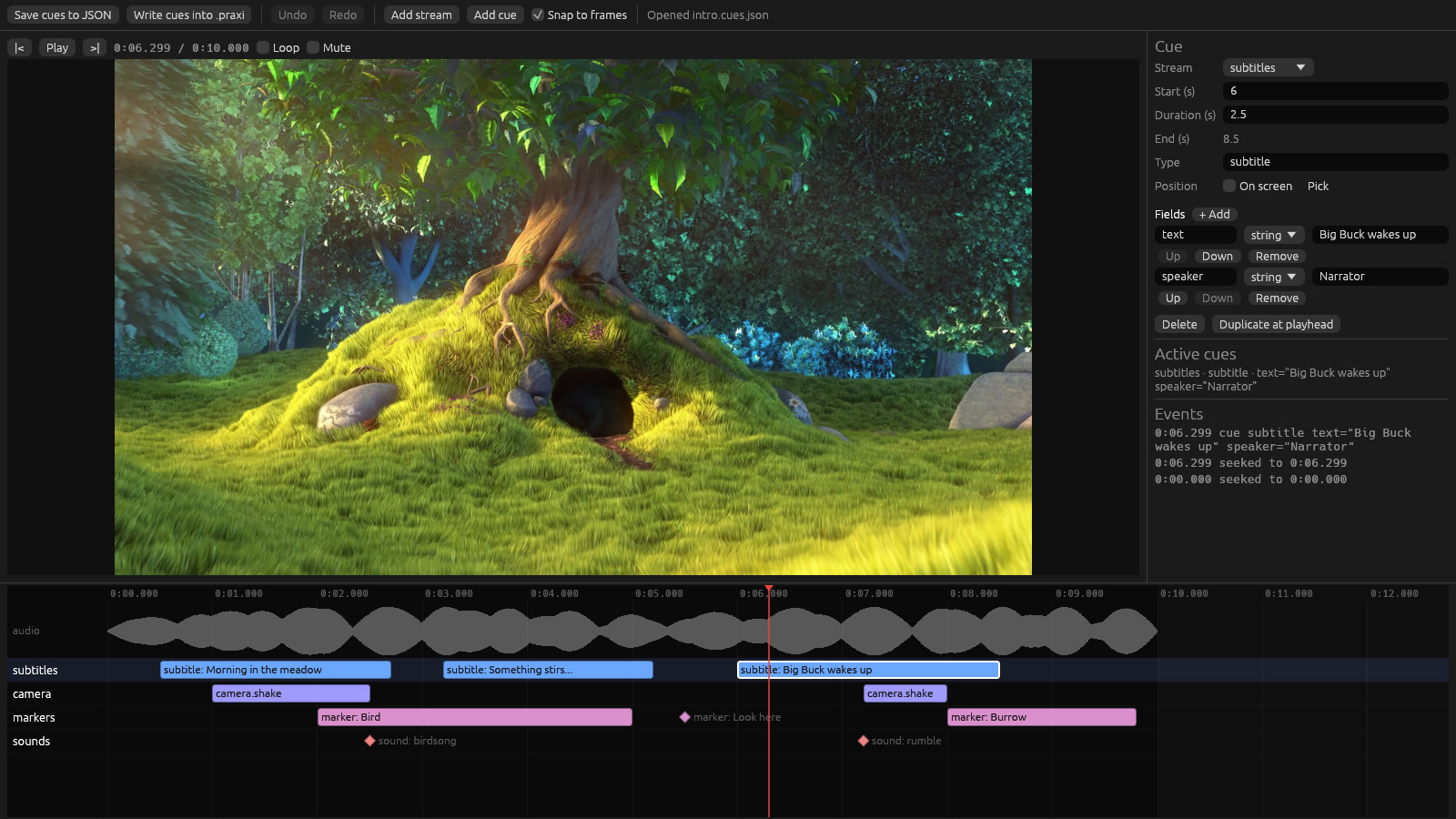
Typing timestamps gets old fast, so there’s praxi-editor. It shows every cue stream as a lane on a timeline over the audio waveform. Bars are cues with a duration, diamonds are markers. Drag a cue to re-time it, snap to frames, and edit its type and typed fields in the inspector. Pick an on-screen position with the mouse. The Active cues and Events panels show exactly what the player emits at the playhead. Edits play back immediately. When you’re done, Save cues to JSON or Write cues into .praxi.
praxi-editor intro.praxi                   # edits intro.cues.json next to the file
praxi-editor intro.praxi subs.en.json      # edits another sheet
For people who’d rather stay inside the engine, praxi-bevy has a cue_editor example built on bevy_egui, with positions picked on the video.
Consuming cues in the game
At runtime a cue parses straight into your own enum with serde. One match replaces a handler registry, and the compiler checks every arm:
#[derive(serde::Deserialize, Clone)]
enum GameCue {
    #[serde(rename = "camera.shake")]
    Shake { strength: f32 },
    #[serde(rename = "subtitle")]
    Subtitle { text: String, speaker: Option<String> },
    #[serde(rename = "sound")]
    Sound { name: String },
}

player.advance(dt)?;
while let Some(event) = player.poll_event() {
    if let praxi::Event::Cue(cue) = &event {
        match cue.parse::<GameCue>() {
            Ok(GameCue::Shake { strength }) => camera.shake(strength),
            Ok(_) => {}
            Err(e) if e.is_unknown_type() => {} // a cue this game doesn't use
            Err(e) => warn!("{e}"),            // cue "camera.shake": field "strength": ...
        }
    }
}
There are two queries on top of the events:
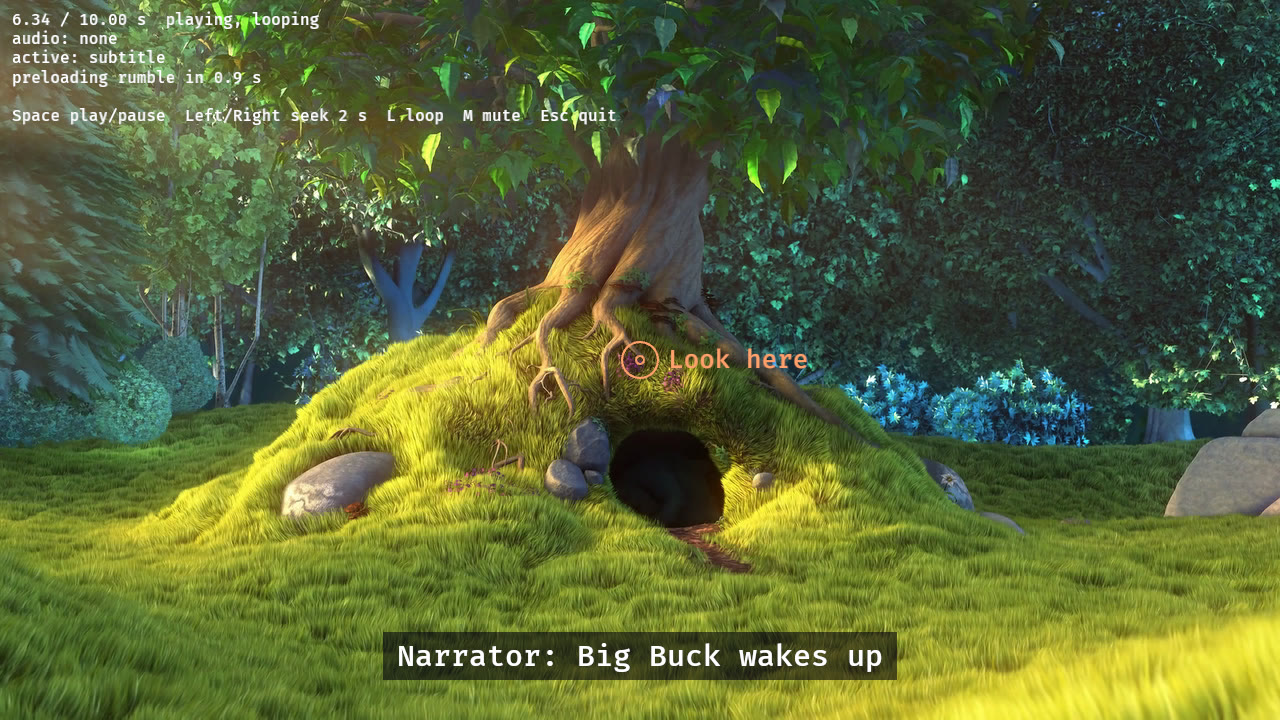
active_cues()gives what is active at the playhead. A subtitle overlay is one line, with noCue/CueEndbookkeeping, and it’s correct after seeks and loops.upcoming_cues(within)lists what starts soon, so the game can preload the sound or model a cue will need before it fires. That’s the “preloading rumble in 0.9 s” line in the screenshot at the top.
Seeking, looping and finishing all end the active cues properly. After a seek, the cues that should already be running are started again, so a camera shake doesn’t stay stuck on after a scrub.
In Bevy, cues arrive as entity events you can observe, and they run in the frame the cue is heard:
commands
    .spawn((Sprite::from_image(video.image.clone()), video, PraxiAudio::default()))
    .observe(|cue: On<PraxiCue<GameCue>>| {
        if let GameCue::Shake { strength } = cue.cue { info!("shake {strength}") }
    });
What’s in the box
praxi: the player. No engine or GPU dependency: advance it with your frame time and upload what it hands out.praxi-wgpu: texture upload, the GPU motion decoder and drawing, forwgpuengines.praxi-bevy: a Bevy 0.20 plugin. Video into anImage, audio through Bevy, cues as observable events.praxi-encoder,praxi-format,praxi-audio, and three binaries:praxi(encode, inspect, export frames, edit cues),praxi-viewerandpraxi-editor.
Audio is PCM, IMA ADPCM or Opus in any channel layout. It’s handed to your mixer from any thread, with the video clock following the audio.
cargo install praxi-cli praxi-viewer praxi-editor
Encoding needs ffmpeg on PATH. Source, specs, and the measurements behind every number above are on GitHub. Licensed MIT or Apache-2.0.
Roadmap
Right now praxi plays in Rust:
- Any Rust engine through the
praxicrate, which has no engine or GPU dependency. - Engines on
wgputhroughpraxi-wgpu, which also runs the GPU motion decoder. - Bevy through
praxi-bevy, with video, audio and cues as observable events.
The next runtime I want is Godot. It isn’t scheduled yet.
You don’t have to wait for your engine, though. The tools don’t care what plays the file. The encoder, the CLI, the viewer and the cue editor work the same whatever the game is written in. Only the runtime needs porting to your language, and the file format (PRAXI.md) and cue sheets (CUESHEET.md) are fully specified for that. A port can start small:
- Block variants first. Read the container, undo LZ4 or the Huffman byte planes, and upload BC7, BC1 or ASTC as a compressed texture. Cues are plain chunks with a type and typed fields.
- The motion codec later. It’s the bigger job: entropy decoding on the CPU plus the three GPU passes, and the output has to match the reference exactly.
- Audio: PCM and IMA ADPCM are simple, and Opus needs a decoder, which most engines already have.
Measurements taken on
All the numbers in this post come from my development machine:
| CPU | AMD Ryzen AI 9 HX 370: 12 cores (4 fast Zen 5, 8 smaller Zen 5c), 24 threads, up to 5.2 GHz |
| RAM | 44 GiB |
| GPU | Radeon 890M (built into the CPU) |
| OS | Pop!_OS 24.04, Linux 7.1 |
Screenshots show Big Buck Bunny, © Blender Foundation, CC BY 3.0.